
Branding Content
AdministratorFoundational~16 mins
This workshop guides you in how to apply a consistent look and feel across your marketing content. Specify your company’s colors, fonts, styles, brand identity, and tone. You can also create as many brands as you need.
Create a Brand
Defining a clear brand identity and brand tone is important as this metadata helps Agentforce generate text that are grounded in your company’s personality.
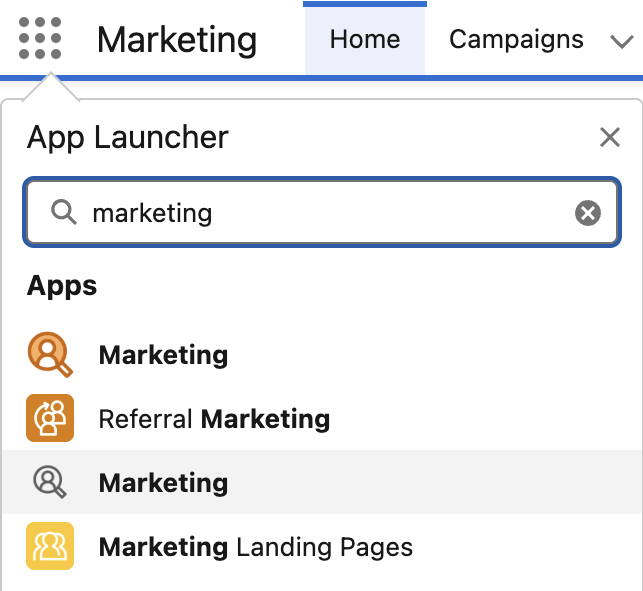
- Search for
Marketingfrom App Launcher. - Select the Marketing App (with a gray icon).
- Select Content tab.
- Select Content Workspace for Marketing Cloud from the list view.
- From the workspace, click the blue Add and select the Content menu option.
- Select the Brand radio button, and then click Create.
- In the Title field, enter
Northern Trail Outfitters. - Copy the below text and enter it in the Description text area field.
Northern Trail Outfitters is a leading outdoor retail brand that provides high-quality gear, apparel, and equipment for hiking, camping, and adventure travel.- Copy the below text and enter it in the Brand Identity text area field.
Northern Trail Outfitters is a leading outdoor retailer that equips adventurers with high-performance, sustainably crafted gear for hiking, camping, and exploration. Northern Trail Outfitters blends rugged performance with environmental responsibility, helping customers experience the world beyond walls. Its mission is to make adventure accessible, responsible, and transformative — connecting people to nature while protecting the wild places they love.

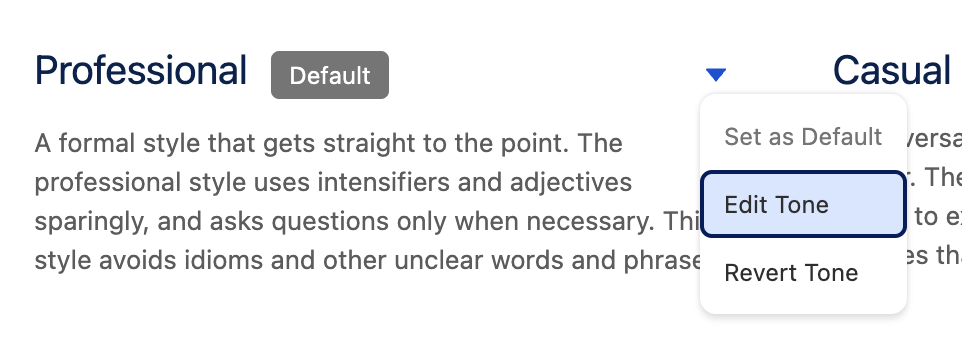
What sets Northern Trail Outfitters apart is its authenticity and deep connection to the outdoors. Every product is designed and tested by real explorers to ensure durability and performance in all conditions. The brand fosters a strong sense of community through loyalty programs, local events, and partnerships that promote sustainability. With a tone that’s knowledgeable yet approachable, Northern Trail Outfitters inspires confidence, curiosity, and care for the environment.- In the Brand Tone section, select Edit Tone from the
menu in the Professional tile.
- Copy the below text and enter it in the Description text area field, then click Done.
A confident, knowledgeable tone that gets straight to the point. The professional style speaks with clarity and purpose, using descriptive language only when it adds value or evokes the spirit of the outdoors. It communicates expertise without exaggeration. This style avoids jargon, slang, and overly casual expressions. It favors simple, direct language that reflects trust, reliability, and experience.- Click on Colors to expand the section, then click the pencil icon
in the Brand Colors tile. - Update the Accent value to
#097fb3. - Optionally, edit other formatting options.
- Click the Save at the top of the page.
- Click the Publish and click Publish Now.
- Click the back arrow
in the top left corner of the page to return to the Content page.
Assign Brand to Your Workspace
We recommend that you assign your primary brand as the default brand in your marketing workspace. The default brand’s settings extend to all your Agentforce Marketing content, but you can create other brands for specific events or products.
- Click the Content tab and select Content Workspace for Marketing Cloud from the list view
- Click the gear icon
and select the Default Brand menu option. - Click Select Brand.
- Select the radio button for 'Northern Trail Outfitters' and click Add, then click Save.